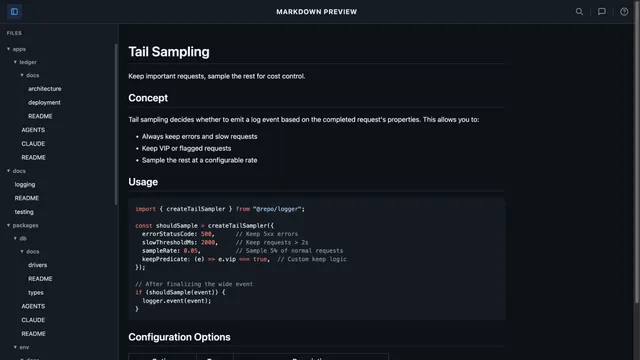
mdp - Preview Markdown Files Instantly in Your Browser
markdown cli productivity tools goEver wanted to quickly preview a Markdown file without opening a full-blown editor or IDE? Meet mdp - a lightning-fast CLI tool that renders your Markdown files in the browser with beautiful GitHub-styled formatting.
Give the project a star on GitHub if you find it useful!
Why mdp?
Most developers work with Markdown daily - READMEs, documentation, notes, changelogs. But previewing them often means:
- Opening VS Code or another heavy editor
- Installing browser extensions
- Using online converters that require copy-pasting
mdp solves this with a single command. Just run mdp README.md and your file opens in the browser, beautifully rendered with GitHub’s familiar styling.
Features at a Glance
- GitHub Flavored Markdown - Tables, task lists, strikethrough, syntax highlighting
- Dark mode support - Automatically follows your system preference
- Multi-file preview - View multiple files with sidebar navigation
- Directory support - Preview all Markdown files in a folder
- Live reload server - Watch files and auto-refresh on changes
- Respects .gitignore - Automatically skips ignored files
- Auto-updates - Get notified when new versions are available
- Cross-platform - Works on macOS, Linux, and Windows
- Zero configuration - Just install and use
Installation
Using Homebrew (macOS)
brew install sadiksaifi/tap/mdpUsing Curl (macOS/Linux)
curl -fsSL https://raw.githubusercontent.com/sadiksaifi/mdp/main/scripts/install.sh | shThis installs mdp to ~/.local/bin and automatically configures your PATH.
From Source
git clone https://github.com/sadiksaifi/mdp.git
cd mdp
make install
Upgrading
mdp automatically checks for updates and notifies you when a new version is available.
Homebrew
brew upgrade sadiksaifi/tap/mdpCurl Installation
mdp upgradeUsage
Preview a Single File
The simplest use case - preview any Markdown file:
mdp README.mdThis converts your Markdown to HTML with GitHub styling and opens it in your default browser. The output is saved to /tmp/mdpreview-README.html.
Preview Multiple Files
Working on documentation with multiple files? Preview them together with a handy sidebar:
mdp README.md CHANGELOG.md docs/getting-started.mdThis creates a single HTML page with all your files accessible through a sidebar navigation panel.
Preview an Entire Directory
Have a docs/ folder full of Markdown? Preview everything at once:
mdp ./docs/mdp will recursively find all .md files, respecting any .gitignore files along the way (including nested ones in monorepos).
Live Reload Server
The --serve flag starts a local development server that watches your files and automatically refreshes the browser when you make changes:
mdp --serve README.mdThis starts a server at http://localhost:8080 and opens it in your browser. Every time you save the file, the preview updates instantly - no manual refresh needed!
Custom Port
Need a different port? Use the --port flag:
mdp --serve --port 3000 ./docs/Perfect for Writing
The live reload feature is ideal for:
- Writing documentation - See your changes in real-time
- Drafting blog posts - Preview formatting as you write
- Editing READMEs - Perfect your project description
- Reviewing changes - Watch updates as teammates edit
Simply save your file and watch the browser update automatically. No more switching windows and hitting refresh!
Multi-File Mode Features
When previewing multiple files or a directory, mdp creates an elegant interface with:
Collapsible Sidebar
The sidebar shows your file tree on the left. On desktop, you can collapse it to focus on the content using the keyboard shortcut:
- Mac:
Cmd + B - Windows/Linux:
Ctrl + B
Your sidebar preference is remembered between sessions.
Mobile Responsive
On smaller screens, the sidebar becomes a hamburger menu. Tap to open, tap outside or press Escape to close. Perfect for reviewing docs on a tablet.
File Tree Navigation
Files are organized just like your directory structure, with folders shown first. Click any file to view its content instantly - no page reload needed.
Real-World Use Cases
Quick README Check
Before pushing to GitHub, preview how your README will look:
mdp README.mdDocumentation Review
Review your entire documentation site locally:
mdp ./docs/Changelog Preview
Check your release notes formatting:
mdp CHANGELOG.mdMeeting Notes
Preview your Markdown meeting notes before sharing:
mdp notes/2024-01-meeting.mdLive Documentation Editing
Write documentation with instant feedback using live reload:
mdp --serve ./docs/Every save automatically refreshes your browser - perfect for documentation sprints or technical writing sessions.
Technical Details
mdp is built with Go for speed and simplicity:
- Uses goldmark for Markdown parsing
- Supports all GitHub Flavored Markdown extensions
- Generates self-contained HTML with embedded CSS
- Live reload powered by WebSocket for instant updates
- File watching via fsnotify
- No external dependencies at runtime
- Single binary, easy to install anywhere
Tips and Tricks
Combine with Other Tools
Chain mdp with file finders for powerful workflows:
# Preview all Markdown files modified today
find . -name "*.md" -mtime 0 | xargs mdp

# Preview specific docs
mdp $(ls docs/*.md)
Use in Scripts
mdp returns proper exit codes, making it useful in scripts:
# Check if Markdown renders without errors
if mdp --help > /dev/null 2>&1; then
    echo "mdp is installed"
fi
Get Started
Install mdp today and simplify your Markdown workflow:
# macOS (Homebrew)
brew install sadiksaifi/tap/mdp

# macOS/Linux (Curl)
curl -fsSL https://raw.githubusercontent.com/sadiksaifi/mdp/main/scripts/install.sh | sh
Check out the GitHub repository for more options and to contribute to the project.
Happy writing!